%20--%3e%3ccircle%20cx='32'%20cy='32'%20r='30'%20fill='rgba(99,102,241,0.05)'%20stroke='url(%23icon-gradient)'%20stroke-width='1.5'/%3e%3c!--%20Left%20bracket%20%3c%20--%3e%3cpath%20d='M12%2020L4%2032L12%2044'%20stroke='url(%23icon-gradient)'%20stroke-width='4'%20stroke-linecap='round'%20stroke-linejoin='round'%20fill='none'/%3e%3c!--%20Central%20E%20--%3e%3cpath%20d='M22%2018H42V24H28V29H40V35H28V40H42V46H22V18Z'%20fill='url(%23icon-accent)'/%3e%3c!--%20Right%20bracket%20%3e%20--%3e%3cpath%20d='M52%2020L60%2032L52%2044'%20stroke='url(%23icon-gradient)'%20stroke-width='4'%20stroke-linecap='round'%20stroke-linejoin='round'%20fill='none'/%3e%3c!--%20Decorative%20dots%20--%3e%3ccircle%20cx='32'%20cy='10'%20r='2'%20fill='%23818CF8'%20opacity='0.7'/%3e%3ccircle%20cx='32'%20cy='54'%20r='2'%20fill='%236366F1'%20opacity='0.7'/%3e%3c/svg%3e)
Dokumentation
Scans durchführen, Scores lesen, die API nutzen und Sicherheitslücken verstehen.
Quick Audit
Das Quick Audit führt ein kostenloses Lighthouse-Audit für jede öffentliche URL durch — ohne Konto. Geben Sie eine URL ein, und VitaPulse analysiert die Seite auf Mobil und Desktop. Sie erhalten vier Scores (Performance, Barrierefreiheit, Best Practices, SEO), Core Web Vitals und eine Liste von Optimierungsmöglichkeiten. Wandeln Sie das Ergebnis in ein überwachtes Projekt um, um Änderungen über die Zeit zu verfolgen.
- Kein Konto erforderlich
- Mobil und Desktop in einem Durchlauf
- 4 Lighthouse-Scores mit Core Web Vitals
- In ein überwachtes Projekt umwandeln
Projekte
Projekte sind das Herzstück von VitaPulse. Jedes Projekt überwacht eine URL und verfolgt ihre Performance über die Zeit. Konfigurieren Sie je nach Plan zwischen 1 und 25 Seiten pro Projekt. Projekte speichern den vollständigen Scan-Verlauf und ermöglichen so Trendanalysen und Regressionserkennung über den gesamten Überwachungszeitraum.
- Eine URL pro Projekt überwachen mit Mehrseitenunterstützung
- Automatische Scans nach Ihrem gewählten Zeitplan (monatlich, wöchentlich oder täglich)
- Vollständiger Scan-Verlauf mit Trendvisualisierung
- Konfigurierbare Einstellungen und projektbezogene Präferenzen
Scans starten
Scans sind Lighthouse-Audits, die gegen die URL Ihres Projekts ausgeführt werden. Starten Sie Scans manuell aus Ihrem Dashboard oder lassen Sie VitaPulse sie automatisch nach einem wöchentlichen Zeitplan ausführen. Jeder Scan analysiert Ihre Seite auf Mobil und Desktop, misst Performance-Scores, Core Web Vitals und führt hunderte einzelner Audits durch. Ergebnisse umfassen Optimierungsmöglichkeiten, Diagnosen und Regressionserkennung.
- Manuelle Scans mit einem Klick aus dem Dashboard
- Automatisierte Zeitplanung: monatlich (Free), wöchentlich (Pro), täglich (Business und Agency)
- Mobil- und Desktop-Analyse in jedem Scan
- Echtzeit-Fortschrittsverfolgung während der Scan-Ausführung
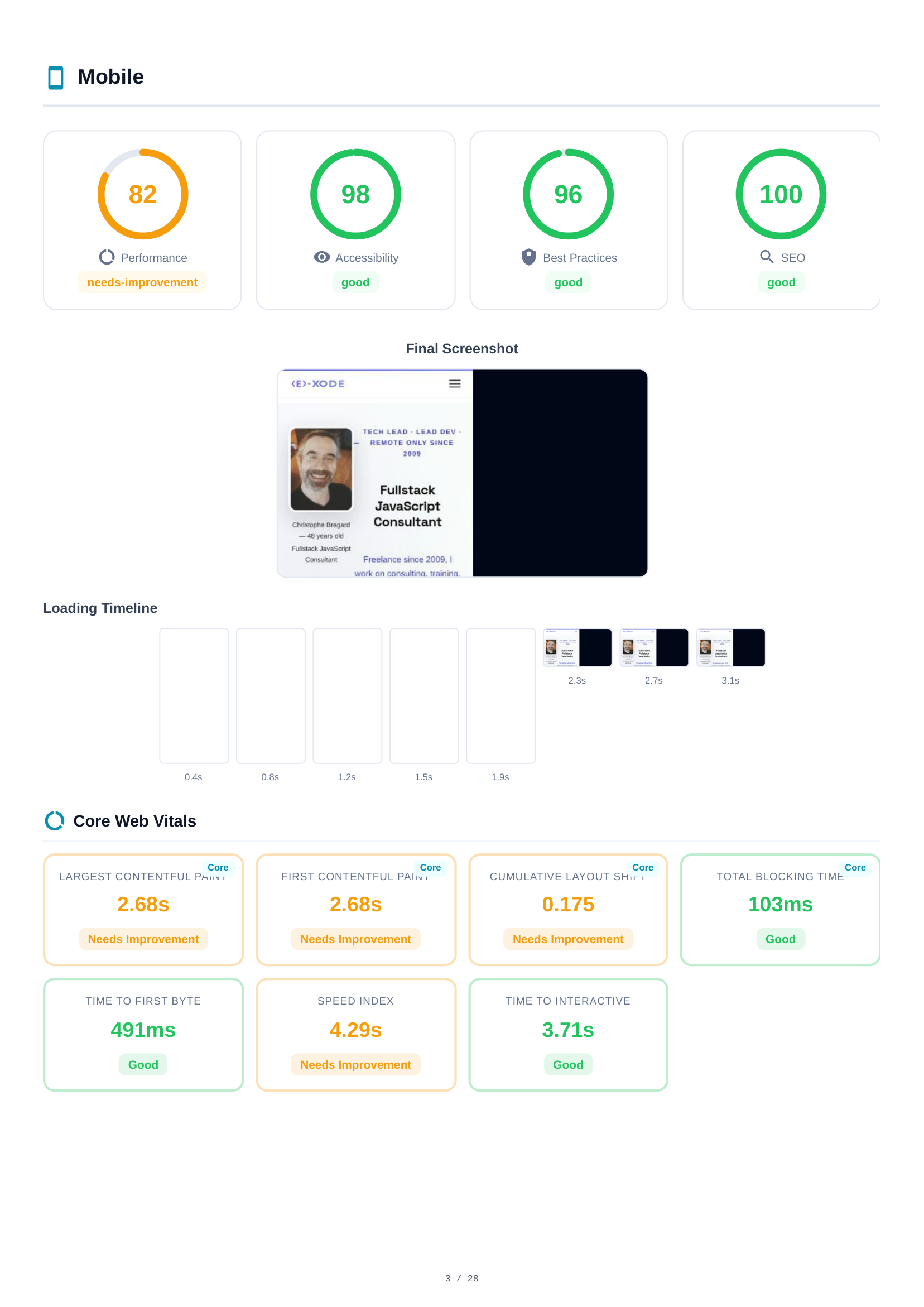
Scores verstehen
VitaPulse gibt für jeden Scan vier Lighthouse-Scores aus, die jeweils von 0 bis 100 bewertet werden. Performance misst Ladegeschwindigkeit und Interaktivität. Barrierefreiheit prüft die Nutzbarkeit für alle Benutzer einschließlich Menschen mit Behinderungen. Best Practices bewertet moderne Web-Standards. SEO analysiert die Suchmaschinenoptimierung. Jeder Score ist farbcodiert: grün (90–100) gut, orange (50–89) verbesserungsbedürftig, rot (0–49) schlecht.
- Performance — Ladegeschwindigkeit, Interaktivität, visuelle Stabilität
- Barrierefreiheit — Screenreader-Unterstützung, Kontrast, ARIA-Labels
- Best Practices — HTTPS, Bildformate, JavaScript-Fehler
- SEO — Meta-Tags, Crawlbarkeit, Mobile-Freundlichkeit
Core Web Vitals
Core Web Vitals sind Googles zentrale Metriken für die reale Nutzererfahrung. VitaPulse verfolgt sechs wesentliche Metriken: Largest Contentful Paint (LCP) misst, wie lange es dauert, bis der Hauptinhalt sichtbar ist. Cumulative Layout Shift (CLS) misst visuelle Stabilität. Interaction to Next Paint (INP) misst Reaktionsfähigkeit. First Contentful Paint (FCP), Speed Index und Total Blocking Time (TBT) vervollständigen das Bild.
- LCP — Largest Contentful Paint (Ziel: < 2,5 s)
- CLS — Cumulative Layout Shift (Ziel: < 0,1)
- INP — Interaction to Next Paint (Ziel: < 200 ms)
- FCP — First Contentful Paint (Ziel: < 1,8 s)
- SI — Speed Index (Ziel: < 3,4 s)
- TBT — Total Blocking Time (Ziel: < 200 ms)
Optimierungsmöglichkeiten & Diagnosen
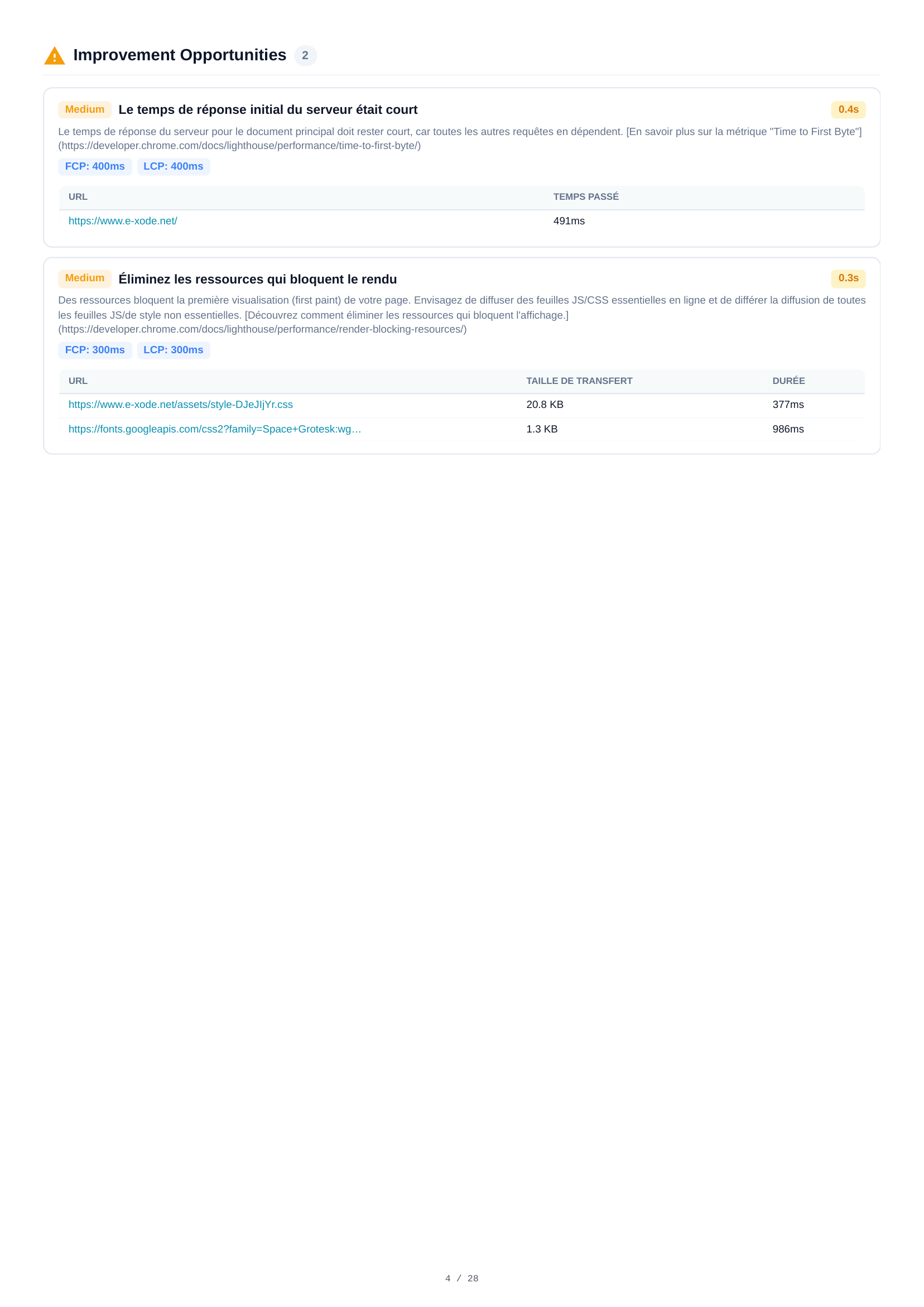
Jeder Scan identifiziert spezifische Möglichkeiten zur Performance-Verbesserung mit geschätzten Zeiteinsparungen — etwa Bildoptimierung, Eliminierung render-blockierender Ressourcen oder Reduzierung ungenutzten JavaScripts. Diagnosen liefern zusätzliche Einblicke in die Architektur Ihrer Seite. Beide sind nach potenziellem Impact sortiert, um die Priorisierung zu erleichtern.
- Geschätzte Zeiteinsparung für jede Möglichkeit
- Nach Impact sortiert — konzentrieren Sie sich auf das Wesentliche
- Detaillierte technische Beschreibungen mit Lösungen
- Erweiterbare Audit-Details mit betroffenen Ressourcen
Regressionserkennung
VitaPulse erkennt Performance-Regressionen automatisch, indem jeder neue Scan mit einer Baseline verglichen wird. Standardmäßig ist die Baseline Ihr zuletzt abgeschlossener Scan, aber Sie können jeden Scan als Referenz-Baseline für stabile Vergleiche festlegen. Wenn Scores sinken oder CWV-Werte über Schwellenwerte hinaus abnehmen, markiert VitaPulse Regressionen mit klaren Vorher/Nachher-Vergleichen.
- Automatischer Vergleich mit der Baseline
- Jeden Scan als Referenz-Baseline für stabile Verfolgung festlegen
- Schwellenwertbasierte Erkennung für Scores und CWV
- Klare visuelle Indikatoren für Regressionen
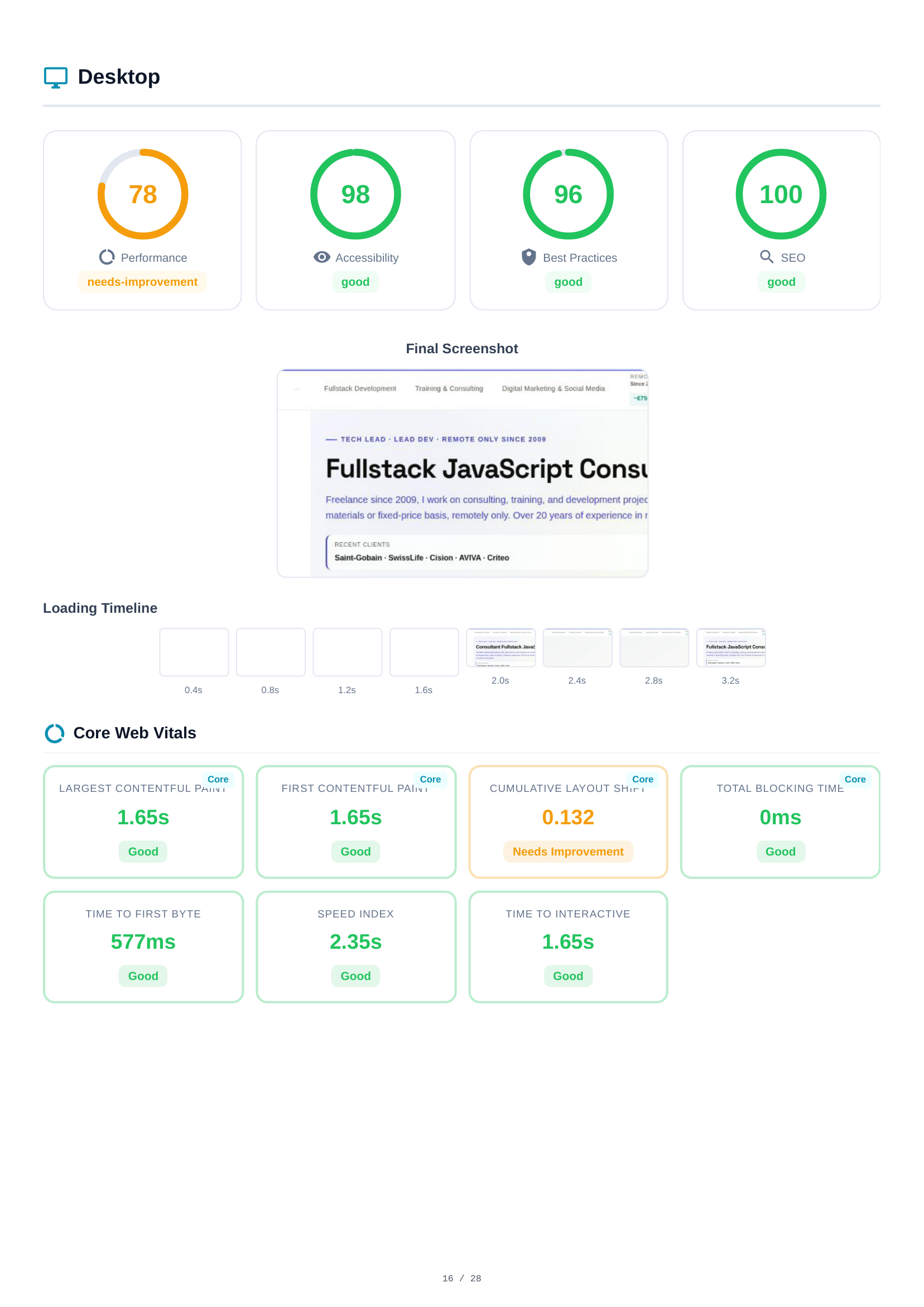
PDF-Berichte
Erstellen Sie einen vollständigen PDF-Bericht für jeden Scan. Er enthält alle Scores, Core Web Vitals, Optimierungsmöglichkeiten, Diagnosen, Regressionsanalyse und Netzwerkanfrage-Details — und gibt genau das wieder, was Sie in der Anwendung sehen. Nutzer des Agency-Plans erstellen White-Label-Berichte ohne VitaPulse-Branding.
- Vollständige Scan-Ergebnisse in einem herunterladbaren PDF
- White-Label-Option für Agency-Plan (kein VitaPulse-Branding)
- Teilbarer öffentlicher Link für Stakeholder-Zugang
- Enthält alle Tabs: Scores, CWV, Optimierungsmöglichkeiten, Regressionen
Mitarbeiter & Freigabe
Nutzer des Agency-Plans können bis zu 10 Mitarbeiter einladen, um bei Projekten zusammenzuarbeiten. Mitarbeiter werden per E-Mail eingeladen und erhalten Zugang zu bestimmten freigegebenen Projekten. Sie können alle Scan-Ergebnisse einsehen, PDF-Berichte herunterladen und manuelle Scans starten (von ihrem eigenen Kontingent abgezogen). Mitarbeiter können keine Projekteinstellungen ändern oder Projekte löschen — das Eigentum bleibt klar geregelt.
- Bis zu 10 Mitarbeiter per E-Mail einladen
- Bestimmte Projekte mit jedem Mitarbeiter teilen
- Mitarbeiter können Ergebnisse einsehen und Scans starten
- Eigentümer behält die volle Kontrolle über Projekteinstellungen
Pläne & Abrechnung
VitaPulse bietet vier Pläne. Free: 1 Projekt, 1 Seite, 30 Scans/Monat, monatliche Auto-Scans, 30 Tage Verlauf. Pro (29 EUR/Monat): 3 Projekte, 5 Seiten je Projekt, 500 Scans, wöchentliche Auto-Scans, PDF-Export, E-Mail-Berichte, API-Zugang, 180 Tage Verlauf. Business (99 EUR/Monat): 15 Projekte, 15 Seiten je Projekt, 6.000 Scans, tägliche Auto-Scans, Regressionsalarme, 365 Tage Verlauf. Agency (249 EUR/Monat): 50 Projekte, 25 Seiten je Projekt, 30.000 Scans, White-Label-PDF, 10 Team-Plätze, 730 Tage Verlauf.
- Free — 1 Projekt, 1 Seite, 30 Scans/Monat
- Pro — 3 Projekte, 5 Seiten, 500 Scans/Monat, PDF-Export, API-Zugang
- Business — 15 Projekte, 15 Seiten, 6.000 Scans/Monat, Regressionsalarme
- Agency — 50 Projekte, 25 Seiten, 30.000 Scans/Monat, White-Label-PDF, 10 Team-Plätze
Sicherheitslücken-Ressourcen
Detaillierte Leitfäden zu Web-Sicherheitslücken, die VitaPulse erkennt. Jeder Leitfaden erläutert das Risiko, die Auswirkung und die schrittweise Behebung.